
If you've ever worked with web applications, APIs, or backend systems, you've probably come across two terms:
Authentication and Authorization.
They sound almost identical.
That's probably why they're so easy to confuse.
You might even hear someone say:
“The user is authenticated, so they're authorized.”
Not necessarily.
A user can be authenticated but still not have permission to perform a particular action.
Understanding this difference is important because authentication and authorization are two fundamental parts of application security.
In this article, let's break down the difference in simple terms, look at real-world examples, and see how both concepts work together in modern applications.
Authentication vs Authorization in One Sentence
Let's make this as simple as possible.
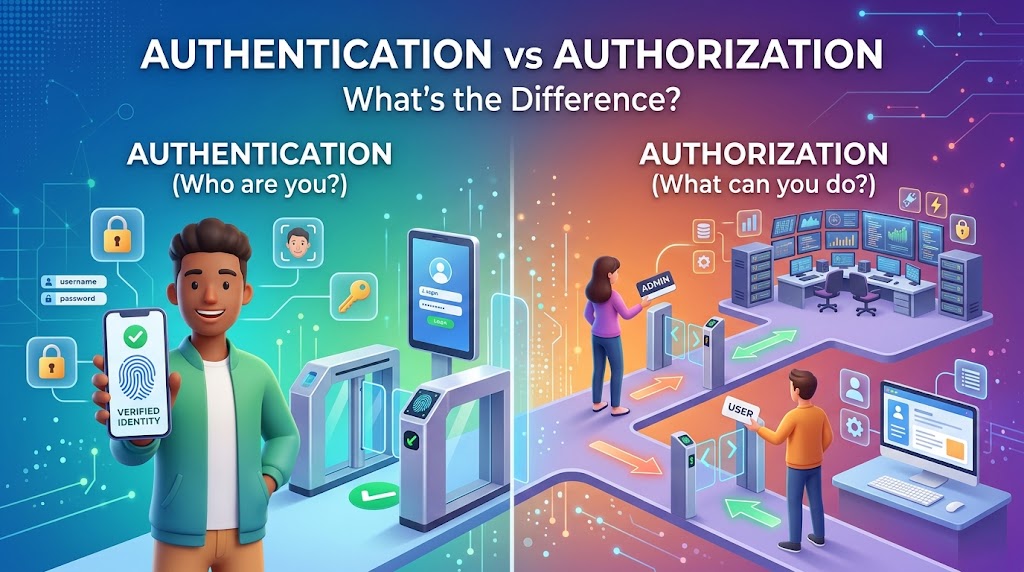
Authentication = Who are you?
Authorization = What are you allowed to do?
That's the core difference.
For example, when you log into an admin dashboard:
Authentication checks:
“Is this really Rizal?”
Authorization checks:
“Is Rizal allowed to access the admin dashboard?”
You need authentication before the system can meaningfully determine what that user is allowed to do.
What Is Authentication?
Authentication is the process of verifying the identity of a user, application, device, or service.
In simple terms:
Authentication proves that you are who you claim to be.
The most familiar example is logging into a website.
You provide:
Email: rizal@example.com
Password: ********
The application checks your credentials.
If they're valid, the system considers you authenticated.
But passwords aren't the only way authentication can work.
Authentication can involve:
Passwords
One-time passwords (OTP)
Authentication apps
Biometrics
Security keys
Passkeys
Access tokens
Certificates
The exact method depends on the application and its security requirements.
A Simple Authentication Flow
Imagine a typical login process:
User
  ↓
Login Request
  ↓
Authentication Service
  ↓
Verify Credentials
  ↓
Valid?
 ├── No → Reject
 └── Yes
       ↓
Authenticated User
Once authentication succeeds, the application now knows the identity associated with the request.
For example:
User ID: 12345
But there's still another question:
What can User 12345 actually do?
That's where authorization comes in.
What Is Authorization?
Authorization is the process of determining whether an authenticated identity has permission to access a resource or perform an action.
In simple terms:
Authorization decides what you're allowed to do.
Let's say you're logged into an e-commerce application.
You are authenticated.
But that doesn't mean you can:
View another customer's private orders
Change another user's password
Delete products
Access the admin dashboard
Issue refunds
Those actions depend on your permissions.
For example:
Role: Customer

Can:
✓ View own profile
✓ View own orders
✓ Create orders

Cannot:
✗ View other users' orders
✗ Delete products
✗ Issue refunds
✗ Access admin settings
Authentication identifies you.
Authorization determines your access.
A Real-World Example: Your Office Building
Here's an easy way to remember the difference.
Imagine you work in an office building.
At the entrance, you scan your employee badge.
The security system checks:
“Is this badge valid?”
That's authentication.
Now you've entered the building.
But can you enter every room?
Probably not.
Your badge might allow you to enter:
Office floor → ✅
Meeting rooms → ✅
Server room → ❌
CEO's office → ❌
That's authorization.
You're authenticated as an employee.
But you're only authorized to access specific areas.
Authentication Happens Before Authorization
In most application flows, authentication comes first.
The simplified process looks like this:
Request
  ↓
Authentication
  ↓
Who is this?
  ↓
Authorization
  ↓
Are they allowed to do this?
  ↓
Allow / Deny
You can't meaningfully determine which permissions belong to a user if the system doesn't know who that user is.
That's why the two concepts are closely related but not interchangeable.
Authentication Example in a Web Application
Let's say you're building a Laravel, Node.js, or other web application.
A user sends:
POST /login
with:
{
  "email": "rizal@example.com",
  "password": "secret"
}
The backend validates the credentials.
If they're correct, the application may return a session or token.
For example:
{
  "token": "eyJhbGciOi..."
}
The client can then use that token when making subsequent requests.
For example:
GET /api/profile
Authorization: Bearer <token>
The token allows the server to identify the caller according to the authentication mechanism being used.
Authentication Example in an API
Modern APIs commonly use mechanisms such as:
Session-based authentication
API keys
OAuth 2.0
OpenID Connect
JWT-based tokens
For example:
GET /api/orders
Authorization: Bearer eyJhbGciOi...
The API first needs to determine:
“Who is making this request?”
After that, it can determine:
“Is this user allowed to view these orders?”
That's where authentication and authorization work together.
Authorization Can Be Role-Based
One common approach is Role-Based Access Control (RBAC).
Instead of assigning every permission individually, users are assigned roles.
For example:
Admin
Manager
Editor
Customer
Guest
Each role can have different permissions.
Example:
Role | View Orders | Create Product | Delete Product | Manage Users |
|---|---|---|---|---|
Admin | ✅ | ✅ | ✅ | ✅ |
Manager | ✅ | ✅ | ❌ | ❌ |
Editor | ✅ | ✅ | ❌ | ❌ |
Customer | Own only | ❌ | ❌ | ❌ |
Guest | ❌ | ❌ | ❌ | ❌ |
This makes permission management easier to organize.
But RBAC isn't the only model.
Other Authorization Models
Depending on the system, you might use:
Role-Based Access Control (RBAC)
Access depends on the user's role.
Example:
Admin → Can delete users.
Attribute-Based Access Control (ABAC)
Access is determined by attributes such as:
User
Resource
Location
Time
Device
Action
For example:
A manager can approve expenses under $5,000.
That's more dynamic than simple role-based access.
Policy-Based Access Control
Authorization decisions are based on defined policies.
For example:
A user can access a document only if they belong to the same organization and have the required permission.
The right model depends on the complexity of your application.
Authentication vs Authorization: A Quick Comparison
Authentication | Authorization |
|---|---|
Identifies the user | Determines permissions |
Answers “Who are you?” | Answers “What can you do?” |
Usually happens first | Happens after identity is known |
Uses credentials or identity mechanisms | Uses roles, permissions, policies, or rules |
Example: Login | Example: Access admin panel |
A simple way to remember it:
Authentication = Identity
Authorization = Permission
What Happens When Authentication Fails?
Authentication usually fails when the system can't verify the identity.
Examples:
Wrong password
Invalid OTP
Expired session
Invalid token
Unknown credentials
The application may respond with something like:
401 Unauthorized
Despite the name, HTTP 401 generally indicates that authentication is required or has failed.
What Happens When Authorization Fails?
Now imagine authentication succeeded.
The system knows who you are.
But you don't have permission to perform the requested action.
For example:
DELETE /api/users/123
You are logged in.
But you're not an administrator.
The server may respond with:
403 Forbidden
A useful mental shortcut is:
401 → “I don't know who you are.”
403 → “I know who you are, but you're not allowed to do that.”
This distinction is particularly useful when designing and debugging APIs.
Why Both Matter for Application Security
Authentication without proper authorization is dangerous.
Imagine an application correctly verifies every user's identity but doesn't properly enforce permissions.
An authenticated customer might be able to call:
GET /api/admin/users
or:
DELETE /api/products/123
That's a serious security issue.
On the other hand, authorization without reliable authentication doesn't make much sense.
The system needs a trustworthy identity before making access decisions.
That's why secure applications treat both as separate but connected concerns.
Common Mistakes Developers Make
1. Assuming Login Means Full Access
Being logged in doesn't mean having unlimited permissions.
Always enforce authorization for protected resources and operations.
2. Relying Only on the Frontend
Hiding an admin button in the frontend is not security.
A malicious user can still call the API directly.
Authorization must be enforced on the server side.
3. Trusting User Input
Never assume that because a client sends:
{
  "role": "admin"
}
the user should become an administrator.
Sensitive privileges must be controlled by trusted server-side logic.
4. Using Only Roles for Everything
A simple role system may work at first.
But more complex applications may eventually need permissions, ownership checks, organization boundaries, or policy-based rules.
5. Forgetting Resource Ownership
Consider:
GET /api/orders/500
The user may be authenticated.
But does order 500 actually belong to them?
That's an authorization question.
Authorization isn't just about roles.
It can also be about who owns the resource.
Authentication and Authorization in Microservices
This becomes even more interesting in a distributed system.
Imagine:
Client
   ↓
API Gateway
   ↓
 ┌─────────────┬─────────────┐
 ↓             ↓             ↓
User Service  Order Service  Payment Service
Authentication might happen at the API Gateway or an identity service.
But each service may still need to enforce authorization for the resources it controls.
For example:
API Gateway
    ↓
Authenticated User
    ↓
Order Service
    ↓
Can this user access Order #500?
The gateway can help with centralized authentication and policy enforcement, but services should not blindly trust client-supplied claims or assume that gateway-level checks are sufficient for every business rule.
Authorization often belongs close to the resource and business logic being protected.
Authentication Isn't Just for Humans
Another important point:
Authentication isn't limited to users.
Systems also need to authenticate:
Mobile applications
Backend services
APIs
Devices
Background jobs
Third-party integrations
For example:
Service A
   ↓
Authentication
   ↓
Service B
Service B needs some way to verify that the request really came from an approved caller.
This is often called machine-to-machine authentication.
Authentication vs Authorization in OAuth
OAuth is another area where people often get confused.
OAuth is primarily an authorization framework for delegated access.
For example, an application may request permission to access certain resources on behalf of a user.
However, OAuth is commonly used alongside OpenID Connect (OIDC) when an application also needs an identity layer for user authentication.
So it's important not to casually treat OAuth and authentication as the same thing.
How to Design Better Authentication and Authorization
A few principles can make a big difference.
Keep Authentication and Authorization Separate
Don't mix identity verification and permission checks into one giant block of logic.
Keep the responsibilities clear.
Use Least Privilege
Give users and services only the permissions they actually need.
Don't give everyone admin-level access just because it's convenient.
Validate Authorization on the Server
The backend should be the final authority on access.
Never rely only on frontend restrictions.
Protect Sensitive Operations
Actions such as:
Changing passwords
Deleting accounts
Issuing refunds
Changing permissions
Accessing private data
should receive particularly careful authorization checks.
Log Important Security Events
Depending on your application, logging events such as failed authentication, privilege changes, and sensitive access can help with monitoring and investigation.
A Simple Mental Model
Whenever you get confused between authentication and authorization, remember this:
Authentication
“Who are you?”
You show your ID.
Authorization
“What are you allowed to access?”
The security guard checks your permissions.
That's it.
Simple, but extremely important.
Final Thoughts
Authentication and authorization are often mentioned together, but they solve different problems.
Authentication verifies identity.
Authorization verifies permissions.
A secure application needs both.
When designing a login system, API, SaaS platform, or microservices architecture, don't stop at:
“Can the user log in?”
Also ask:
“What is this user allowed to do after logging in?”
That second question is where many security problems begin.
Good security isn't only about keeping the wrong people out.
It's also about making sure the right people can access only the right things.