
Have you ever paid for something online and received a notification a few seconds later?
Or connected your application to a payment provider, and somehow your system immediately knew that the payment had succeeded?
You might wonder:
“How did the other system know that something happened?”
One common answer is:
Webhooks.
Webhooks are widely used in modern web applications to let one system notify another system when an event happens.
They are especially useful for things like:
Payment notifications
Order updates
GitHub events
Chat notifications
Email events
Subscription changes
Third-party integrations
The concept is actually pretty simple.
But understanding how webhooks work can make a big difference when you're building APIs, SaaS products, automation workflows, or integrations with external services.
Let's break it down.
What Is a Webhook?
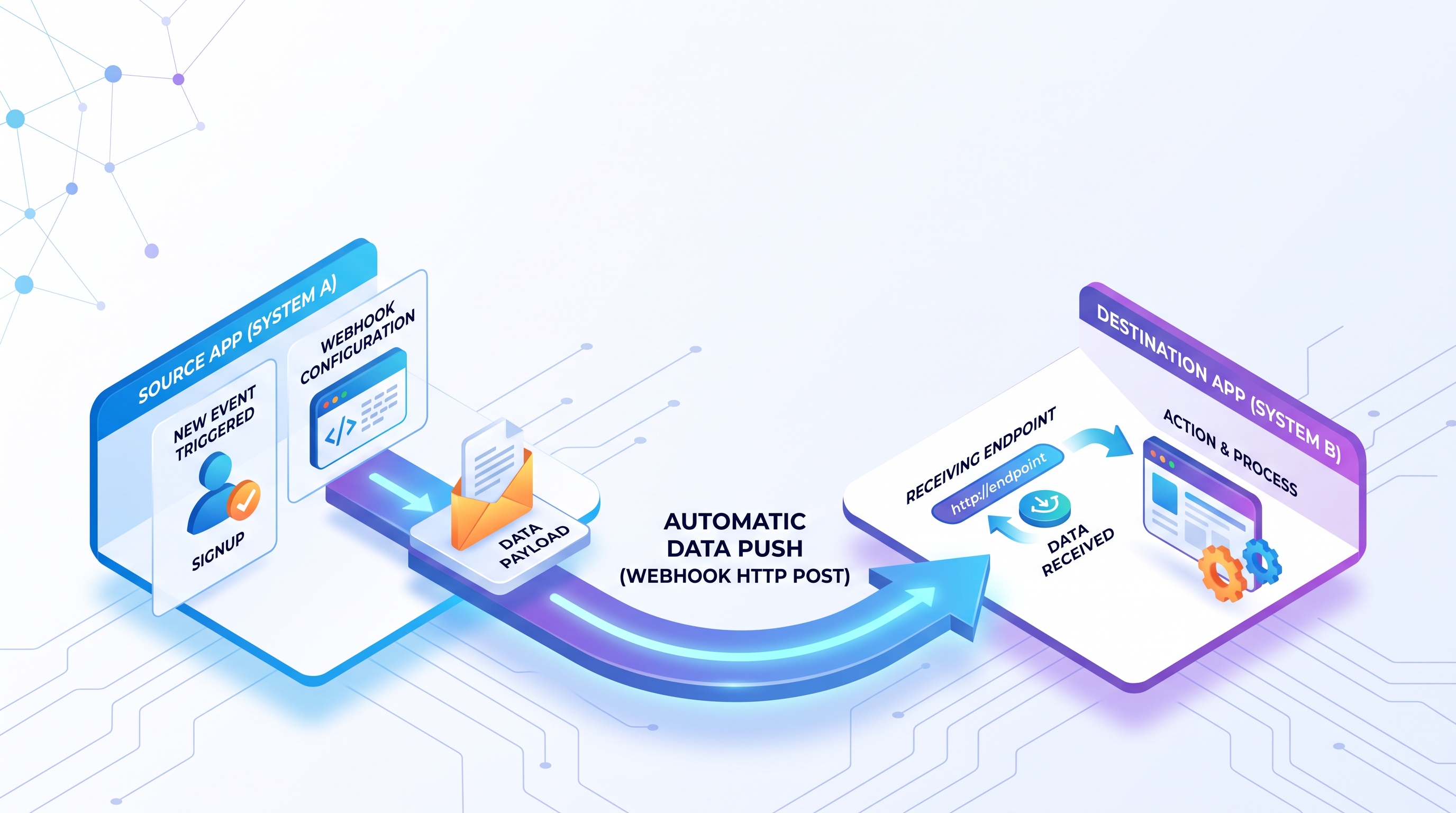
A webhook is a mechanism that allows one application to automatically send an HTTP request to another application when a specific event occurs.
In simple terms:
Something happens → System A sends a notification → System B receives it.
For example:
Payment Completed
       ↓
Payment Provider
       ↓
Webhook Request
       ↓
Your Application
       ↓
Update Order Status
Instead of your application constantly asking:
“Did the payment succeed?”
the payment provider can simply tell your application when the event happens.
That is the key idea behind webhooks.
A Simple Real-World Example
Imagine you're building an e-commerce website.
A customer places an order and pays using an external payment provider.
Your system sends the customer to the payment provider.
Now your application needs to know:
“Did the payment succeed?”
Without a webhook, your application might repeatedly check the payment provider:
Your App → “Is the payment completed?”
Provider → “Not yet.”

Your App → “Is it completed now?”
Provider → “Not yet.”

Your App → “Now?”
Provider → “Yes.”
This approach is commonly known as polling.
With a webhook, the flow is different:
Customer Pays
     ↓
Payment Provider
     ↓
Webhook
     ↓
Your API
     ↓
Payment Confirmed
The provider sends the notification to you.
You don't need to keep asking.
How Does a Webhook Work?
The process usually looks like this:
1. You Provide a Webhook URL
Your application exposes an endpoint such as:
POST https://example.com/webhooks/payment
This endpoint is designed to receive webhook events.
2. You Register the URL
You tell the third-party platform where it should send events.
For example:
Webhook URL:
https://example.com/webhooks/payment
3. An Event Happens
Maybe:
Payment successful
or:
New GitHub push
or:
Customer subscription canceled
4. The Provider Sends an HTTP Request
The external service sends a request to your webhook endpoint.
For example:
POST /webhooks/payment
Content-Type: application/json
with a payload such as:
{
  "event": "payment.completed",
  "order_id": "ORD-12345",
  "amount": 99.00
}
5. Your Application Processes the Event
Your application receives the request and performs the necessary action.
For example:
Payment Webhook
      ↓
Validate Request
      ↓
Check Event
      ↓
Update Order
      ↓
Send Confirmation
That's the basic webhook flow.
Webhook vs API: What's the Difference?
This is where many developers get confused.
APIs and webhooks are both used for communication between systems, but they usually work in different directions.
Traditional API
Your application asks another system for information.
Your App
   ↓
GET /orders
   ↓
External API
   ↓
Response
Your application initiates the request.
Webhook
The external system sends information to your application when something happens.
External System
       ↓
Webhook Event
       ↓
Your Application
The external system initiates the request.
A simple way to remember it:
API: “Give me the information.”
Webhook: “I'll tell you when something happens.”
Webhook vs Polling
Another important comparison is webhook vs polling.
Polling
Your application repeatedly checks for updates.
App → Check
App → Check
App → Check
App → Check
This can work, but it may create unnecessary requests.
Imagine checking every 30 seconds for a payment that might happen only once every few minutes.
Your system is doing work even when nothing has changed.
Webhook
With a webhook:
Nothing happens → No request
Event happens → Webhook sent
This is often more efficient for event-driven communication.
However, webhooks are not a replacement for every polling scenario. Polling can still be useful when the external system does not support webhooks, when events can be missed, or when the application needs to periodically reconcile state.
Common Webhook Use Cases
Webhooks are everywhere in modern software.
Payment Processing
Payment providers commonly use webhooks to notify merchants about events such as:
payment.completed
payment.failed
refund.created
chargeback.created
Your application can then update the order or payment status.
GitHub Integration
GitHub can send webhook events when things happen in a repository.
For example:
Push
Pull Request
Issue
Release
This allows other systems to react automatically.
For example:
GitHub
   ↓
Webhook
   ↓
CI/CD Pipeline
   ↓
Build
   ↓
Deploy
Subscription Platforms
SaaS applications often need to know when a subscription changes.
For example:
subscription.created
subscription.updated
subscription.canceled
A webhook can trigger your application to update the user's account status.
Communication and Notifications
A webhook can also trigger notifications in systems such as:
Slack
Discord
Microsoft Teams
CRM systems
Internal notification services
For example:
New Customer
    ↓
Webhook
    ↓
CRM
    ↓
Sales Notification
E-Commerce
Webhooks can be used to react to:
New orders
Payment confirmation
Shipment updates
Inventory changes
Refunds
This makes them useful for connecting multiple systems in an e-commerce environment.
What Does a Webhook Payload Look Like?
A webhook usually sends data in the HTTP request body.
JSON is a common format.
For example:
{
  "id": "evt_123456",
  "type": "order.created",
  "created_at": "2026-09-01T12:00:00Z",
  "data": {
    "order_id": "ORD-1001",
    "customer_id": "CUS-2001",
    "amount": 149.99
  }
}
The exact structure depends on the provider.
A well-designed webhook payload usually includes enough information for the receiver to understand what happened and identify the affected resource.
What Should Your Webhook Endpoint Do?
A webhook endpoint should generally be designed to handle incoming events safely and efficiently.
A simplified flow might be:
Receive Request
      ↓
Verify Signature
      ↓
Validate Payload
      ↓
Check Event ID
      ↓
Store Event
      ↓
Return 2xx
      ↓
Process Asynchronously
This approach is useful because webhook providers may retry delivery when they don't receive a successful response.
The endpoint should therefore avoid doing a lot of slow work before acknowledging the event.
Why Are Webhook Retries Important?
Here's a common scenario.
A payment provider sends:
payment.completed
Your server is temporarily unavailable.
The provider doesn't receive a successful response.
What happens next?
Depending on the provider's behavior, it may retry the webhook.
That means your system might receive the same event more than once.
For example:
Webhook #1
Webhook #1 retry
Webhook #1 retry
This introduces an important concept:
Webhook Idempotency
Your webhook handler should ideally be idempotent.
In simple terms:
Processing the same event multiple times should not create an incorrect result.
For example, if a payment event says:
Payment completed
Order: ORD-123
your application shouldn't accidentally mark the order as paid twice, create two invoices, or trigger duplicate fulfillment because the webhook was retried.
One common strategy is to store a unique event ID:
evt_123456
Before processing the event, check:
“Have I already handled this event?”
If yes, skip duplicate processing.
This small design decision can prevent some very annoying production bugs.
Webhook Security: Don't Trust Every Request
A webhook endpoint is publicly reachable by design.
That means you should treat incoming requests carefully.
Otherwise, anyone could potentially send fake requests to your endpoint.
Imagine someone sends:
{
  "event": "payment.completed",
  "order_id": "ORD-123"
}
Your system shouldn't blindly trust it.
A common security technique is signature verification.
The sender includes a cryptographic signature, and your application verifies that signature using a shared secret or provider-specific verification mechanism.
Conceptually:
Webhook Request
      ↓
Signature
      ↓
Verify
      ↓
Valid?
 ├── No → Reject
 └── Yes
       ↓
   Process Event
Depending on the provider, additional controls can include:
HTTPS
Secret tokens
IP allowlists
Timestamp validation
Replay protection
Request authentication
The exact security mechanism should follow the provider's documentation.
Why HTTPS Matters
Always protect webhook traffic with HTTPS in production.
Without HTTPS, sensitive payload data can potentially be exposed or modified while traveling between systems.
For a production webhook endpoint, think:
https://example.com/webhooks/payment
not:
http://example.com/webhooks/payment
Security should be part of the webhook design from the beginning, not added later.
What Happens If Your Webhook Processing Is Slow?
This is another common issue.
Suppose the webhook provider sends an event to your API.
Your application then:
Verifies the request
Updates the database
Calls another external API
Generates a PDF
Sends an email
Runs several business rules
The provider may be waiting for a response the entire time.
That's risky.
A better pattern is often:
Webhook Request
      ↓
Validate
      ↓
Store Event
      ↓
Return 200 OK
      ↓
Queue / Worker
      ↓
Process Event
This approach separates receiving the event from doing the heavy work.
It can improve reliability and make your webhook endpoint much more resilient.
Webhooks Are Event-Driven
A useful way to think about webhooks is that they are part of event-driven architecture.
Instead of constantly asking:
“Has something changed?”
your application waits for events.
For example:
Order Created
     ↓
Webhook Event
     ↓
Inventory Service
     ↓
Notification Service
     ↓
Analytics Service
Different systems can react to the same event.
This is one reason webhooks are so useful for integrations.
Webhook Architecture Example
Imagine you are building a SaaS application connected to a payment provider.
Your architecture might look like:
                 ┌─────────────────┐
                 │ Payment Provider│
                 └────────┬────────┘
                          │
                       Webhook
                          ↓
                ┌──────────────────┐
                │   Webhook API    │
                └────────┬─────────┘
                         ↓
                ┌──────────────────┐
                │ Event Processing │
                └────────┬─────────┘
                         ↓
                   ┌───────────┐
                   │ Database  │
                   └───────────┘
For more complex applications, you might introduce a queue:
Payment Provider
       ↓
Webhook API
       ↓
Message Queue
       ↓
Worker
       ↓
Database
       ↓
Other Services
This architecture can help absorb traffic spikes and separate responsibilities.
Common Webhook Mistakes
1. Doing Too Much Work Immediately
Don't make the webhook endpoint wait for every downstream operation.
Acknowledge the event quickly and process heavy work asynchronously where appropriate.
2. Ignoring Duplicate Events
Assume retries can happen.
Design for idempotency.
3. Not Verifying Signatures
Never blindly trust incoming webhook requests.
4. Returning Incorrect HTTP Status Codes
Your response tells the provider whether delivery was successful.
Make sure your endpoint returns an appropriate status code based on the provider's delivery contract.
5. No Logging
When a webhook fails at 2 AM, logs become your best friend.
Record useful information such as:
Event ID
Event type
Timestamp
Processing result
Error details
Be careful not to log sensitive credentials or secrets.
6. Not Having a Recovery Strategy
What happens if processing fails?
You may need:
Retry logic
Dead-letter queues
Manual replay
Reconciliation jobs
Alerting
A webhook integration is not complete just because the endpoint works.
You also need to think about failure scenarios.
When Should You Use a Webhook?
A webhook is a great fit when:
An external system needs to notify your application about events.
For example:
Payment status changes
New order created
GitHub push
Subscription canceled
Customer updated
File processing completed
The more event-driven your workflow becomes, the more useful webhooks can be.
When Should You Avoid Using a Webhook?
Webhooks may not be the right tool when:
The provider doesn't support them reliably
You need to frequently query current state rather than react to events
You need guaranteed event ordering but the provider doesn't provide it
Your system cannot expose a secure public endpoint
The integration is so simple that another mechanism is easier
Sometimes a scheduled API request is still the better choice.
Architecture should follow the problem.
Not the trend.
Webhook vs Message Queue
Webhooks and message queues are related, but they are not the same thing.
A webhook usually connects:
External System → Your Application
A message queue usually helps systems communicate asynchronously:
Service A → Queue → Service B
For example:
Stripe
   ↓
Webhook
   ↓
Your API
   ↓
Queue
   ↓
Worker
In this architecture, a webhook can be the entry point, while a queue handles internal asynchronous processing.
This combination is common in systems that need better resilience and scalability.
How to Build a Reliable Webhook Integration
A production-ready webhook integration should ideally consider:
Security
Verify signatures and protect the endpoint.
Idempotency
Handle duplicate events safely.
Reliability
Expect retries and temporary failures.
Observability
Log and monitor events.
Performance
Respond quickly and move heavy processing to background jobs when appropriate.
Recovery
Have a strategy for failed events.
These considerations make the difference between a webhook that works in development and a webhook that survives production.
Final Thoughts
Webhooks are one of those concepts that sound complicated at first but are actually quite simple.
The basic idea is:
Something happens → Another system gets notified.
Instead of constantly asking an external service for updates, your application can react when an event occurs.
That makes webhooks incredibly useful for payment integrations, SaaS platforms, e-commerce systems, automation workflows, and modern API integrations.
But don't stop at simply creating a webhook endpoint.
Think about:
Security.
Retries.
Idempotency.
Logging.
Failure recovery.
Because the real challenge isn't getting a webhook to work.
The real challenge is making sure it keeps working when something goes wrong.
And that's where good backend engineering starts to matter.
Building an API Integration or SaaS Product?
Need help connecting your application with payment providers, third-party APIs, SaaS platforms, or event-driven systems?
I work on backend development, API integration, software architecture, and digital product development, and I'm open to freelance projects, technical consulting, and collaboration opportunities.
Whether you're building a new integration or trying to make an existing system more reliable, I'd be happy to explore the technical problem with you.
Have a project in mind? Let's discuss the architecture and find a practical solution.
Have you ever built or debugged a webhook integration? What was the most challenging part?