
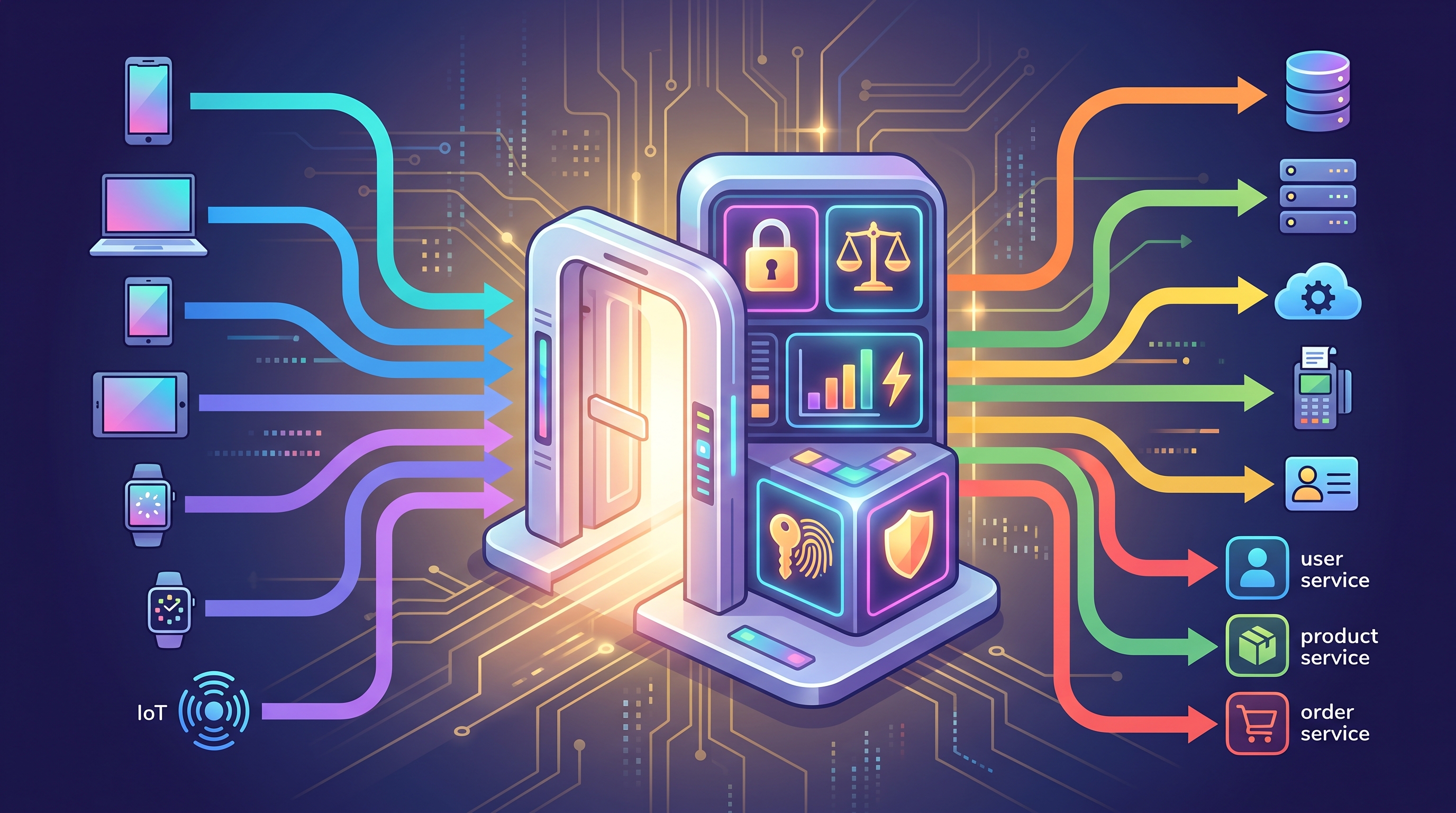
If you've worked with modern web applications, you've probably heard the term API Gateway.
Maybe you saw it in a microservices architecture diagram.
Maybe someone suggested:
“Let's put an API Gateway in front of all our services.”
Sounds professional.
But here's the real question:
Do you actually need one?
Because an API Gateway can solve some very real architecture problems, but adding one to an application that doesn't need it can also introduce unnecessary complexity.
In this article, I'll explain what an API Gateway is, how it works, what problems it solves, and—most importantly—when you should and shouldn't use one.
What Is an API Gateway?
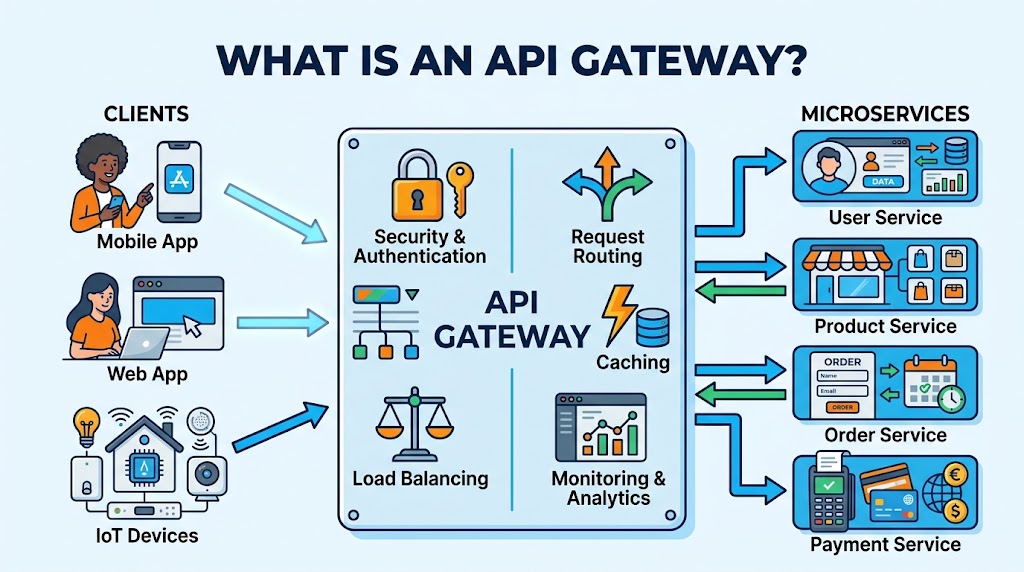
An API Gateway is a server that sits between clients and backend services.
Instead of clients communicating directly with multiple backend services, they communicate with the API Gateway.
The basic flow looks like this:
Client → API Gateway → Backend Services
For example, imagine an e-commerce platform with several services:
User Service
Product Service
Order Service
Payment Service
Notification Service
Without an API Gateway, a frontend application might communicate with each service separately:
Frontend → User Service
Frontend → Product Service
Frontend → Order Service
Frontend → Payment Service
With an API Gateway:
Frontend → API Gateway → Multiple Services
The API Gateway becomes the main entry point to the backend.
Why Do We Need an API Gateway?
At first, it might seem like an unnecessary middle layer.
Why not let the frontend call each service directly?
That's a reasonable question.
The answer becomes clearer as your system grows.
Imagine your application has 20 backend services.
Now your frontend needs to know:
Where each service is located
Which endpoint to call
How each service authenticates requests
How to handle different protocols
What to do when one service is unavailable
How to manage rate limits
How to monitor all those requests
Your frontend can quickly become tightly coupled to the backend architecture.
An API Gateway helps hide some of that complexity.
The client only needs to know:
“Talk to the API Gateway.”
The gateway takes care of routing requests to the appropriate services.
How Does an API Gateway Work?
Let's use a simple example.
A mobile application needs to display an order history.
The request might look like:
GET /api/orders
Authorization: Bearer <token>
The mobile application sends the request to the API Gateway.
The gateway can then:
Validate the request
Authenticate the user
Check permissions
Route the request to the Order Service
Apply rate limiting
Forward the request
Return the response to the client
The client doesn't necessarily need to know where the Order Service is actually running.
That separation can make the architecture easier to manage.
API Gateway vs Reverse Proxy
These two concepts are often confused.
A reverse proxy sits in front of backend servers and forwards client requests to the appropriate destination.
An API Gateway can do that too.
But an API Gateway typically provides additional capabilities specifically useful for APIs.
These may include:
Authentication
Authorization
Rate limiting
Request validation
Request transformation
API versioning
Logging
Monitoring
Traffic management
Request aggregation
So you can think of an API Gateway as a reverse proxy with API-specific responsibilities.
The exact capabilities depend on the technology you're using.
Common API Gateway Responsibilities
One of the biggest benefits of an API Gateway is centralizing common concerns.
1. Authentication
Instead of every backend service implementing the same authentication flow independently, the API Gateway can validate tokens before forwarding requests.
For example:
Client
   ↓
API Gateway
   ↓
Validate JWT
   ↓
Order Service
This can reduce duplicated logic.
However, that doesn't mean backend services should blindly trust the gateway. Sensitive services may still perform their own authorization or validation.
2. Authorization
Authentication answers:
“Who are you?”
Authorization asks:
“Are you allowed to do this?”
For example, the gateway may determine that:
GET /orders
is available to authenticated users, while:
DELETE /orders/{id}
requires additional privileges.
The exact authorization model should still be designed carefully, especially for sensitive business operations.
3. Rate Limiting
Imagine a client accidentally sends thousands of API requests in a few seconds.
That can overload your services.
An API Gateway can apply rules such as:
100 requests / minute / user
or:
1,000 requests / minute / API key
This helps protect backend systems from excessive traffic.
4. Request Routing
The gateway decides where each request should go.
For example:
/api/users/*      → User Service
/api/products/*   → Product Service
/api/orders/*     → Order Service
/api/payments/*   → Payment Service
This allows the client to use a consistent API entry point while backend services remain independently deployed.
5. Request and Response Transformation
Sometimes different systems expect different formats.
An API Gateway can transform requests or responses where appropriate.
For example:
Client → JSON
Gateway → Internal format
Service → JSON
Gateway → Client response
This can be especially useful when integrating legacy systems or multiple backend technologies.
6. API Aggregation
This is one of the more interesting use cases.
Imagine a mobile app needs:
User profile
Recent orders
Loyalty points
Without aggregation, the client might make three requests:
Mobile App
 ├──→ User Service
 ├──→ Order Service
 └──→ Loyalty Service
With an API Gateway, the client could make one request:
Mobile App
      ↓
 API Gateway
   ↙   ↓   ↘
User  Order Loyalty
Service Service Service
The gateway combines the results and returns one response.
This can reduce the number of network calls made by the client.
When Should You Use an API Gateway?
An API Gateway becomes more valuable when your system has growing architectural complexity.
Here are some common situations where it makes sense.
You Have Multiple Backend Services
If your application has multiple independent services, a gateway can provide a consistent entry point.
For example:
Client
   ↓
API Gateway
 ├── User Service
 ├── Product Service
 ├── Order Service
 └── Payment Service
This is especially common in microservices architectures.
You Have Multiple Types of Clients
Imagine your backend serves:
Web application
iOS app
Android app
Partner integrations
Each client may have different needs.
An API Gateway can help expose client-specific APIs or aggregate backend responses.
You Need Centralized API Security
If your organization needs consistent handling of:
Authentication
Rate limiting
API keys
Access policies
TLS termination
a gateway can become a useful control point.
You Need Better Traffic Management
As your traffic grows, you may need capabilities such as:
Load balancing
Rate limiting
Circuit breaking
Routing rules
Traffic policies
An API Gateway can help centralize some of these concerns.
You Need to Hide Internal Services
Your internal services don't necessarily need to be directly accessible from the internet.
Instead:
Internet → API Gateway → Private Services
This can reduce direct exposure of internal components.
Of course, the gateway itself must be properly secured. It is not a replacement for a complete network security strategy.
When Should You NOT Use an API Gateway?
This is just as important.
An API Gateway isn't automatically a best practice for every application.
Your Application Is Small
Imagine you're building a simple SaaS application.
You have:
One frontend
One backend
One database
Adding an API Gateway might simply give you:
Client → Gateway → Backend → Database
Why introduce another layer?
Unless the gateway solves a specific problem, it may just add operational overhead.
You Have Very Few Services
If you only have two small services, direct communication may be perfectly reasonable.
Architecture should solve problems—not win diagram competitions.
Your Team Isn't Ready to Operate It
An API Gateway becomes another production component.
That means:
Configuration
Monitoring
Logging
Security
Deployment
Scaling
Troubleshooting
If your team doesn't have the operational maturity to manage it, the gateway may become a new source of problems.
API Gateway in Microservices Architecture
API Gateways are strongly associated with microservices.
That's understandable.
Microservices create distributed systems with multiple independent services.
Without a gateway, clients can become tightly coupled to those services.
For example:
Mobile App
 ├──→ User Service
 ├──→ Product Service
 ├──→ Order Service
 ├──→ Payment Service
 └──→ Notification Service
Now imagine one service changes its URL.
Or authentication rules.
Or API version.
Or deployment location.
The client may need to change too.
With a gateway:
Mobile App
      ↓
 API Gateway
      ↓
 ┌────┼────┬────┐
 ↓    ↓    ↓    ↓
User Product Order Payment
The gateway provides an abstraction layer between clients and internal services.
That can make backend evolution easier.
But There Is a Trade-Off
An API Gateway isn't free.
It introduces another component that can fail.
You now have:
Client → Gateway → Service
instead of:
Client → Service
That means you must think about:
Gateway availability
Latency
Scaling
Configuration management
Observability
Security
Deployment
Failure handling
The gateway can also become a bottleneck if poorly designed.
Even worse, it can become a single point of failure if you don't deploy it redundantly.
So the architecture needs to account for high availability.
API Gateway vs Service Mesh
Another concept worth understanding is the service mesh.
An API Gateway generally focuses on north-south traffic:
External Client
      ↓
 API Gateway
      ↓
 Internal Services
A service mesh is typically focused on east-west traffic:
Service A ↔ Service B
Service B ↔ Service C
Service C ↔ Service D
In a large distributed system, you may use both.
They solve different problems.
An API Gateway manages external API access.
A service mesh can help manage service-to-service communication.
Popular API Gateway Technologies
Depending on your stack and requirements, there are many options.
Some commonly used technologies include:
The right choice depends on factors such as:
Cloud platform
Deployment model
Team expertise
Traffic volume
Security requirements
Cost
Required API management features
The goal isn't to choose the most popular tool.
The goal is to choose the tool that solves your actual problem.
A Simple Decision Framework
Before introducing an API Gateway, ask yourself:
How many services do we have?
One backend?
You may not need one.
Twenty services?
A gateway becomes more interesting.
How many clients do we have?
One web app?
Maybe unnecessary.
Web + mobile + partner integrations?
The value becomes more obvious.
Do we need centralized API policies?
If you're dealing with authentication, rate limiting, API keys, and traffic policies, a gateway can help.
Do clients need aggregated responses?
If clients repeatedly call multiple services for a single screen, aggregation may make an API Gateway useful.
Can our team operate another production component?
This question is often overlooked.
Architecture isn't only about technical capability.
It's also about operational capability.
The Most Important Lesson
The biggest lesson I've learned about API Gateways is this:
Don't introduce one just because your architecture diagram looks more sophisticated with it.
Architecture should be driven by real problems.
If your application has multiple services, multiple clients, centralized security requirements, and increasing traffic complexity, an API Gateway may be a very good fit.
If you're building a small application with a single backend, adding one may simply create another layer to maintain.
The best architecture is not the one with the most components.
It's the one that solves the right problem with the right amount of complexity.
Final Thoughts
An API Gateway can be a powerful part of modern software architecture.
It can give your clients a single entry point, centralize API policies, simplify routing, support traffic management, and reduce some of the complexity of working with distributed services.
But it's not a magic solution.
And it's definitely not something you should add just because “everyone uses microservices.”
Start with your problem.
Understand your traffic.
Understand your clients.
Understand your team.
Then decide whether an API Gateway actually adds value.
Because good architecture isn't about adding more layers.
It's about adding the right layers for the problems you're trying to solve.